Contact us to purchase  →  arslan.ziya@gmail.com
▶ Tutorial Videos
Home FootballBasketball VolleyballHandball RugbyHockey FutsalWater Polo Aussie Football StadiumsHow to Buy Downloads ⬇ Download Demo

Basketball
Scoreboard
Software

Millisecond-accurate timing, shot clock, quarter management, and full player stats — all on one LED display. Now with a built-in TCP data socket for live external data feeds.

⏱️

Millisecond Timing

Even with rapid play/pause actions there is no drift. Time is synced directly from the CPU clock signal.

🏀

Shot Clock & Fouls

Shot clock, team fouls, quarter tracking — all displayed in real-time on the LED scoreboard.

🔑

Lifetime License

One-time payment. Free updates for 2 years. No annual or maintenance fees.

🎨

Edit Every Object

User-replaceable designs. Edit positions, colors, sizes, and fonts of all objects using CSS styles.

🔌

Live data feed - over TCP

Drive the scoreboard from an external system — the table officials' console, your statistics software, or a full venue automation setup. basketBoard7 now includes a built-in.

📱

Free Mobile Remote

iPhone and Android remote control app included. Free API endpoints for third-party software integration.

Software Preview

Control panel &
LED output

Below: the operator control panel (left) and the corresponding LED display output (right).

Operator Control Panel

Manage your basketball game on the LED display from a single, intuitive control form.

Basketball scoreboard control panel
Basketball scoreboard on LED display
New in basketBoard7

Live data feed
over TCP

Drive the scoreboard from an external system — the table officials' console, your statistics software, or a full venue automation setup. basketBoard7 now includes a built-in data socket server: connect once over TCP and stream scores, game clock, shot clock, fouls, rosters and player statistics in real time.

TCP Port 2907 UTF-8 Line-based Persistent Multi-client

What you can push from outside

  • Home / guest scores, game clock and the 24‑second shot clock
  • Team fouls, a timeout countdown and two extra info lines
  • Complete team rosters — starting five plus substitutes
  • Per‑player fouls and points for the live statistics display
  • Only the keys you send change — every other value on the board is preserved
  • Each line returns one reply, so your client always knows it was applied

Clock ownership: if you feed CHRONO, SC or TIMEOUT continuously, the operator must leave the internal clock off — each clock has to be driven by exactly one side, otherwise the two sources overwrite each other.

tcp · 127.0.0.1 : 2907
# send rosters
ROSTER;TEAM=H;LIST=7,SMITH|11,JOHNSON|23,WILLIAMS,S
!OK:ROSTER:3

# team names + tip-off state
HOMENAME=CITY;GUESTNAME=UNITED;CHRONO=10:00
!OK:3

# live update: score, clock, shot clock
HOMESCORE=78;GUESTSCORE=65;CHRONO=07:42;SC=14
!OK:4

# player stats (07 = 7)
PLAYER;TEAM=H;NO=07;FOUL=2;PTS=15
!OK:PLAYER

# number not in roster
PLAYER;TEAM=H;NO=99;FOUL=0;PTS=0
#PLAYER_NOT_FOUND:99
KEY=VALUE

Scoreboard data

A plain key/value line updates the board directly: HOMESCORE, GUESTSCORE, CHRONO, SC, HOMEFOUL, GUESTFOUL, TIMEOUT, EXTRA1/EXTRA2.

ROSTER

Team roster upload

Send a team's full player list (No,Name[,Group]) in one line. A new roster starts a fresh game and resets that team's statistics.

PLAYER

Player statistics

Push one player's absolute foul and point totals. Numbers are matched against the roster, so 07 and 7 are treated as the same.

Scoreboard data keys

KeyDescriptionExample
HOMESCOREHome team score78
GUESTSCOREGuest team score65
HOMENAMEHome team name (\n = line break)CITY\nBASKET
GUESTNAMEGuest team nameUNITED
CHRONOGame clock07:42
SCShot clock14
HOMEFOULHome team fouls (total)3
GUESTFOULGuest team fouls (total)5
TIMEOUTTimeout countdown; empty value clears0:45
EXTRA1Extra text line 1FINAL FOUR
EXTRA2Extra text line 2GROUP A
↓ Download basketBoard Request integration manual → Data Socket Protocol v1.0 · TCP :2907 · UTF-8

Multi-referee control
from phone or tablet

basketBoard includes a free web-based remote — open it in any phone or tablet browser, nothing to install. A PIN gate locks access until the operator's PIN is entered. Because the remote accepts several connections at once, the time-keeper, scorer and shot-clock operator can each work from a separate device, fully focused on their own job.

PhoneTabletiOSAndroidNo install
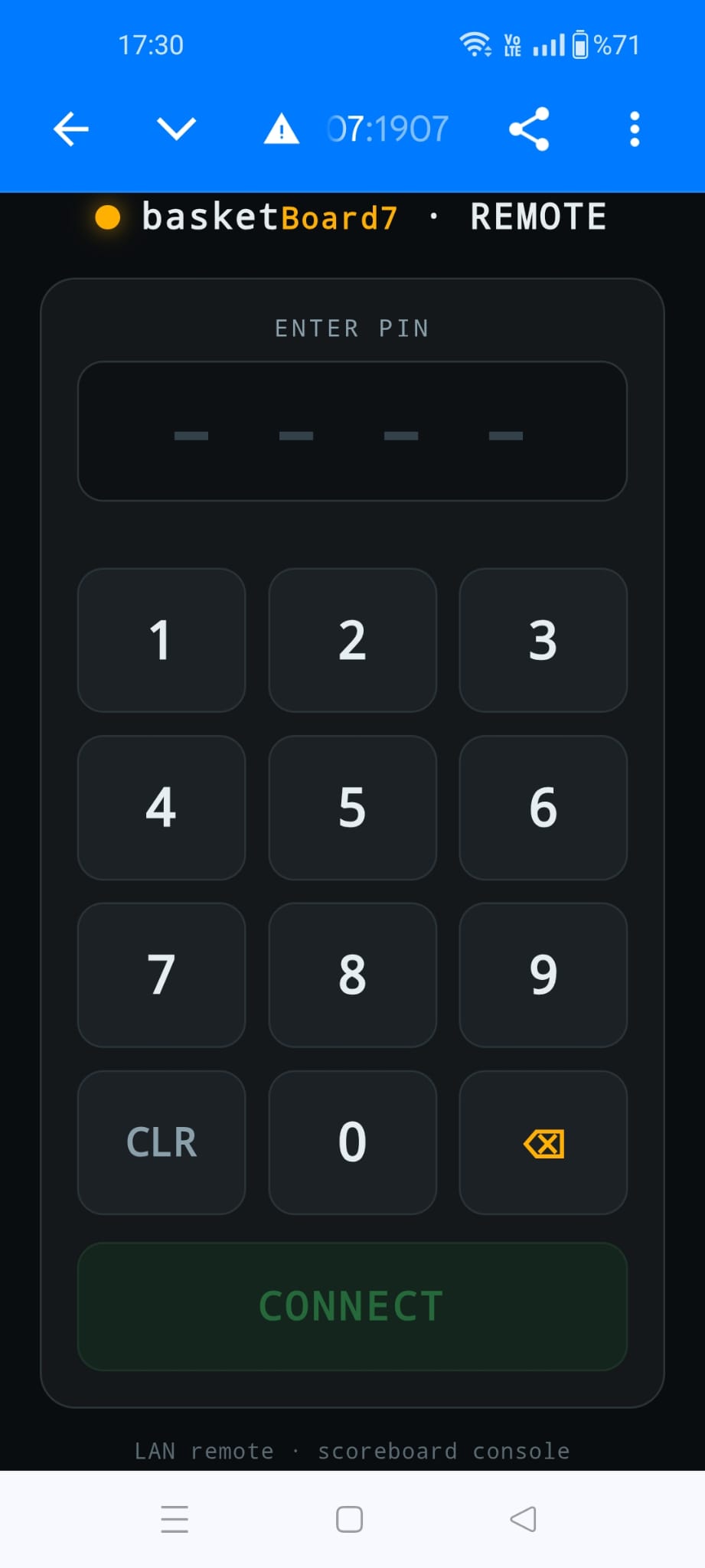
basketBoard remote control PIN login screen
Login

PIN-Protected Login

No one connects without the PIN — which you set and change inside basketBoard.

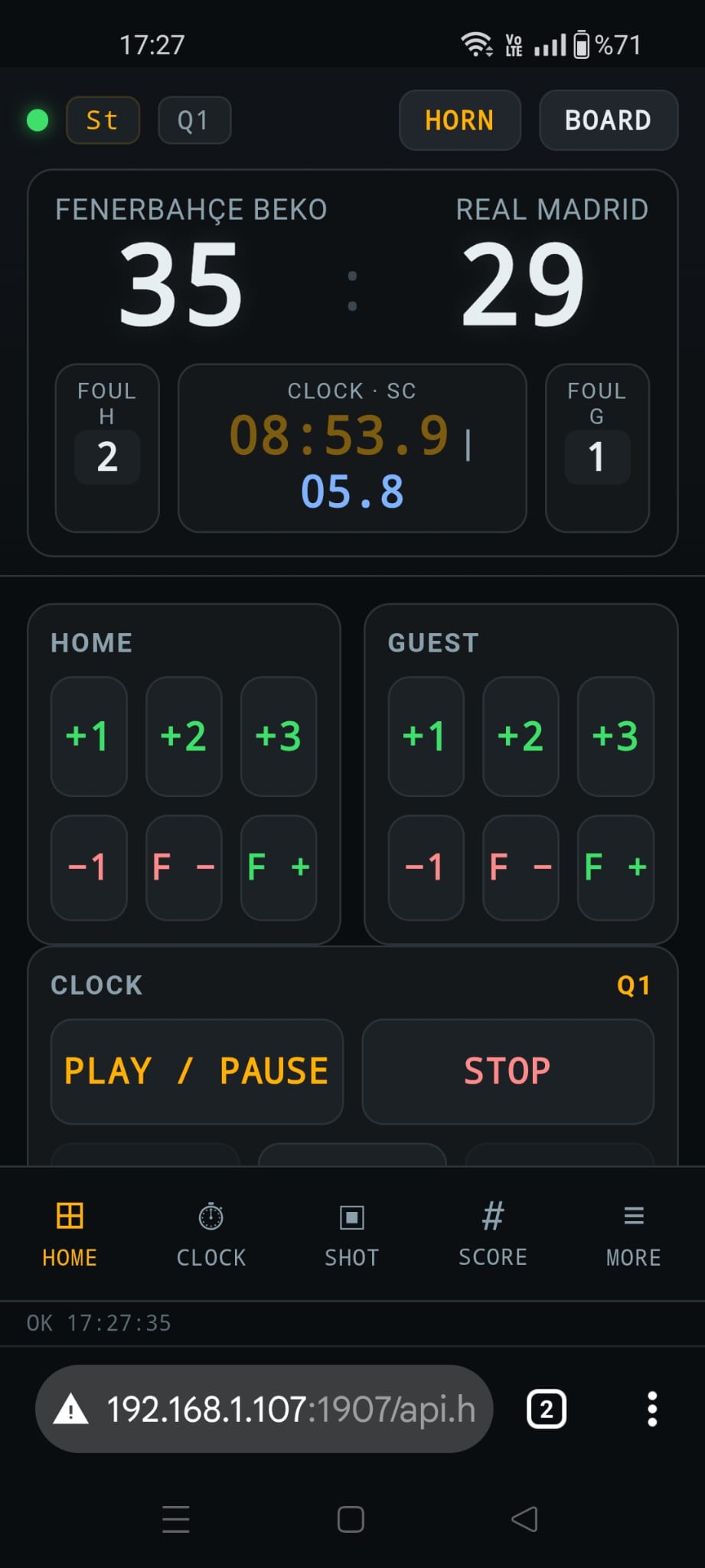
basketBoard remote HOME tab — score, fouls, clock, shot clock, period
Home

Full Board, One Screen

Score, team fouls, game clock, shot clock and period — every core control in one place.

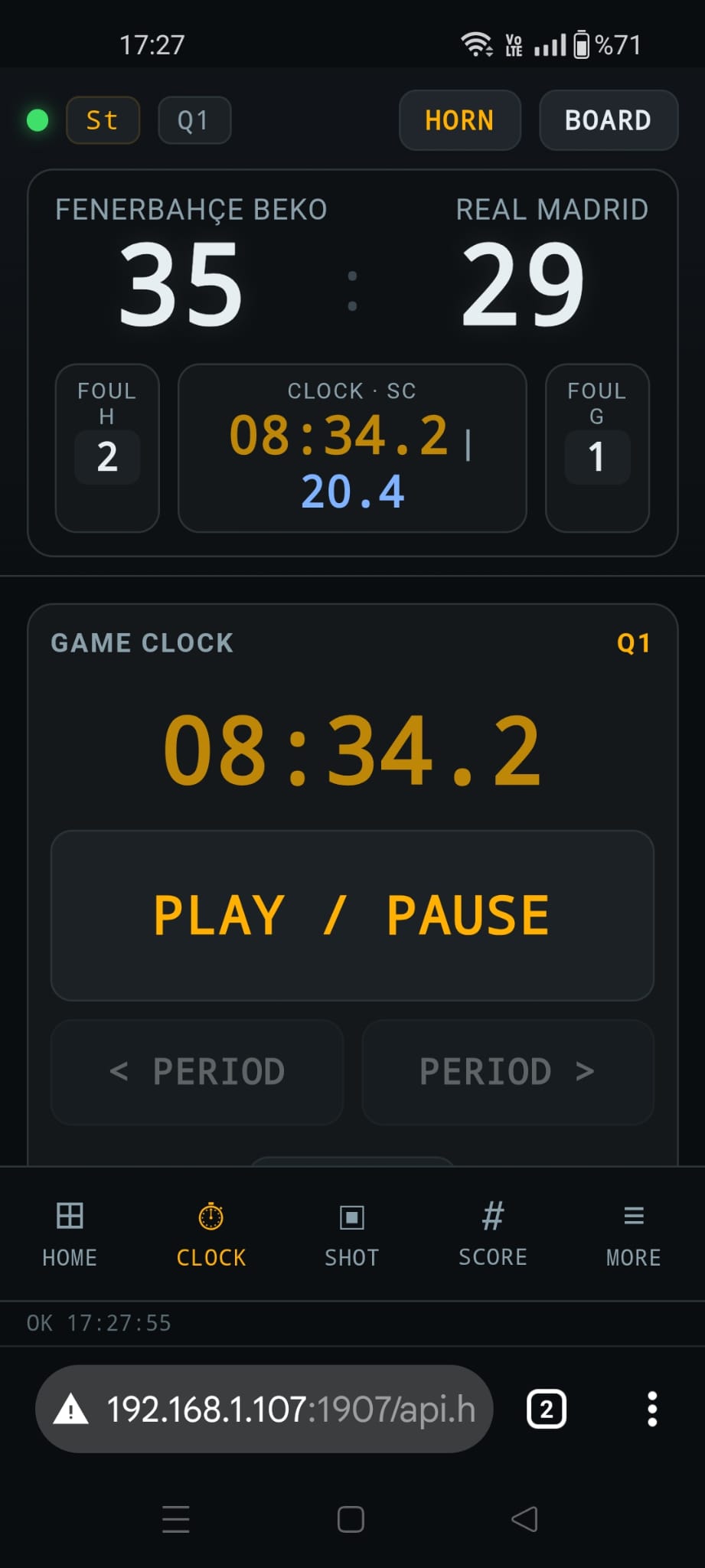
basketBoard remote CLOCK tab — main game clock control
Clock

Game Clock Only

A dedicated screen for the main clock: edit, Start, Stop and Resume — nothing else to distract.

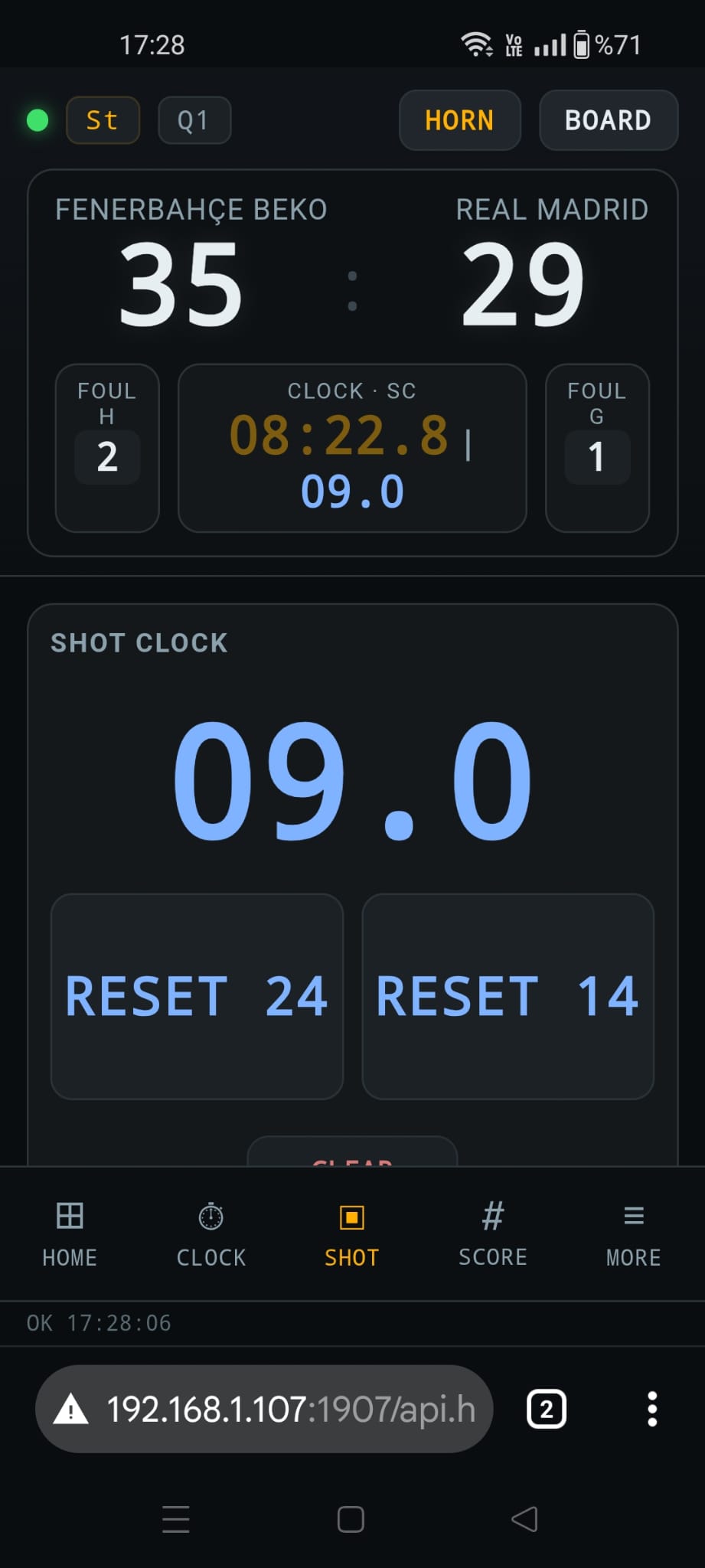
basketBoard remote SHOT tab — 14/24 second shot clock control
Shot

Shot Clock Only

A focused screen for the 14 / 24-second shot clock: edit, Start, Stop and Resume.

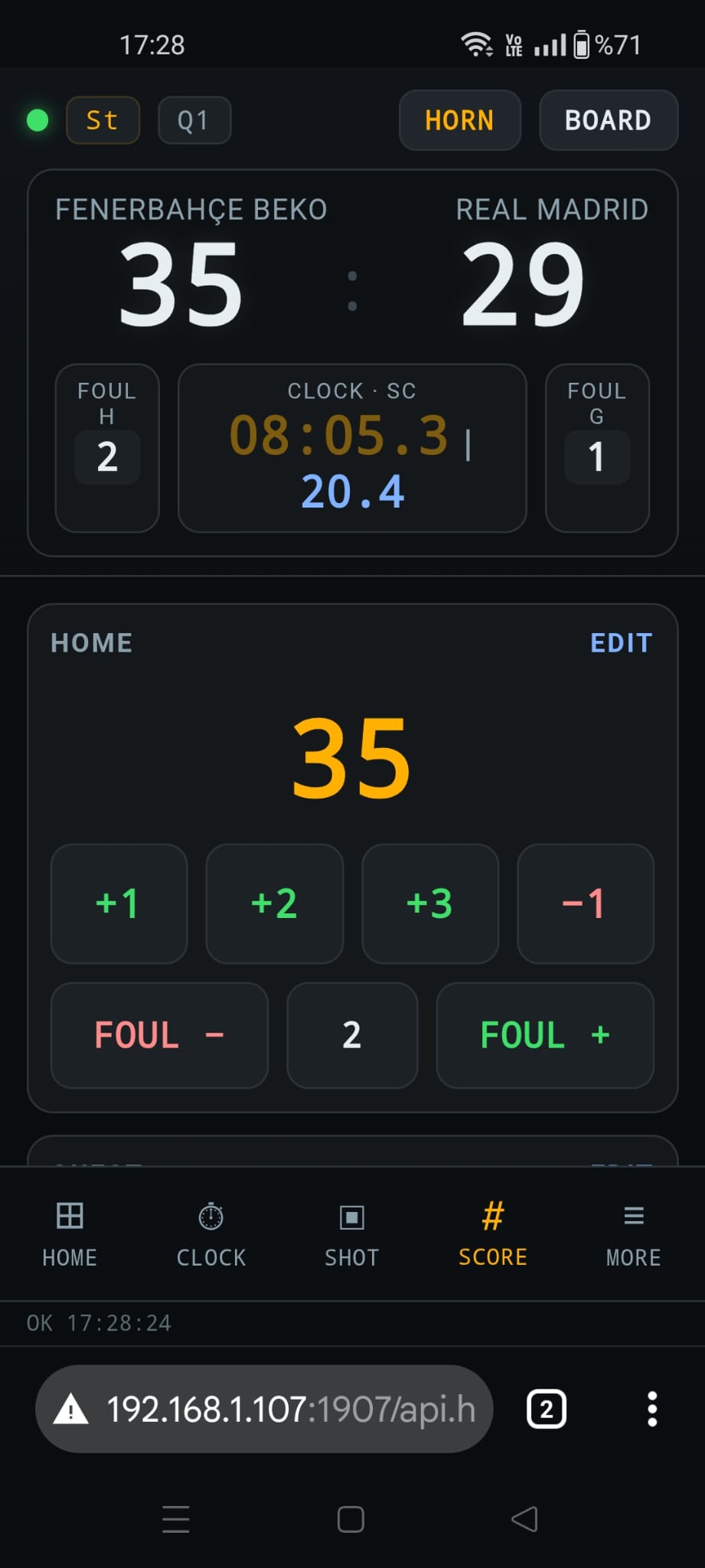
basketBoard remote SCORE tab — score management
Score

Score Only

Pure score management — ideal for a dedicated scorer at the table.

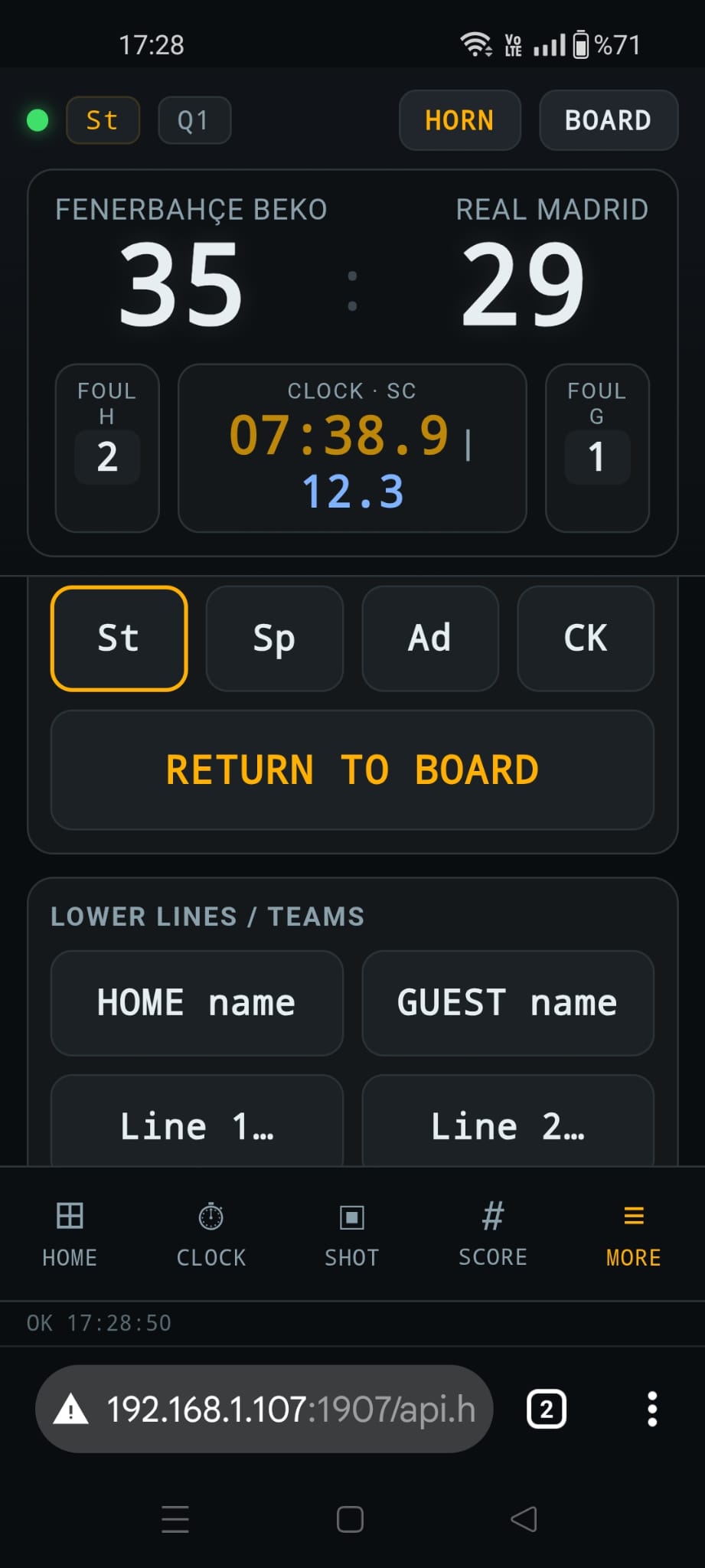
basketBoard remote MORE tab — media playlists and data entry
More

Media & Data

Play media-player playlists and enter data such as team names.

Built for the table. The remote accepts several simultaneous connections, so time, score and shot clock can be driven by different referees on different devices at the same time — each one concentrated on a single task with its own focused screen.

Try basketBoard Free

Full-featured demo. All functions available — minor visual watermark only.

⬇ Download Now Pricing →
Licensing

Lifetime License.
No annual fees.

One-time payment. Free updates for 2 years. PC License Key and USB Dongle both included.

See Pricing → Stadium References →

Need a different sport?

soccerBoard supports 9 sports — football, basketball, volleyball, handball, rugby, hockey, futsal, water polo, and Australian football.

View All Sports →